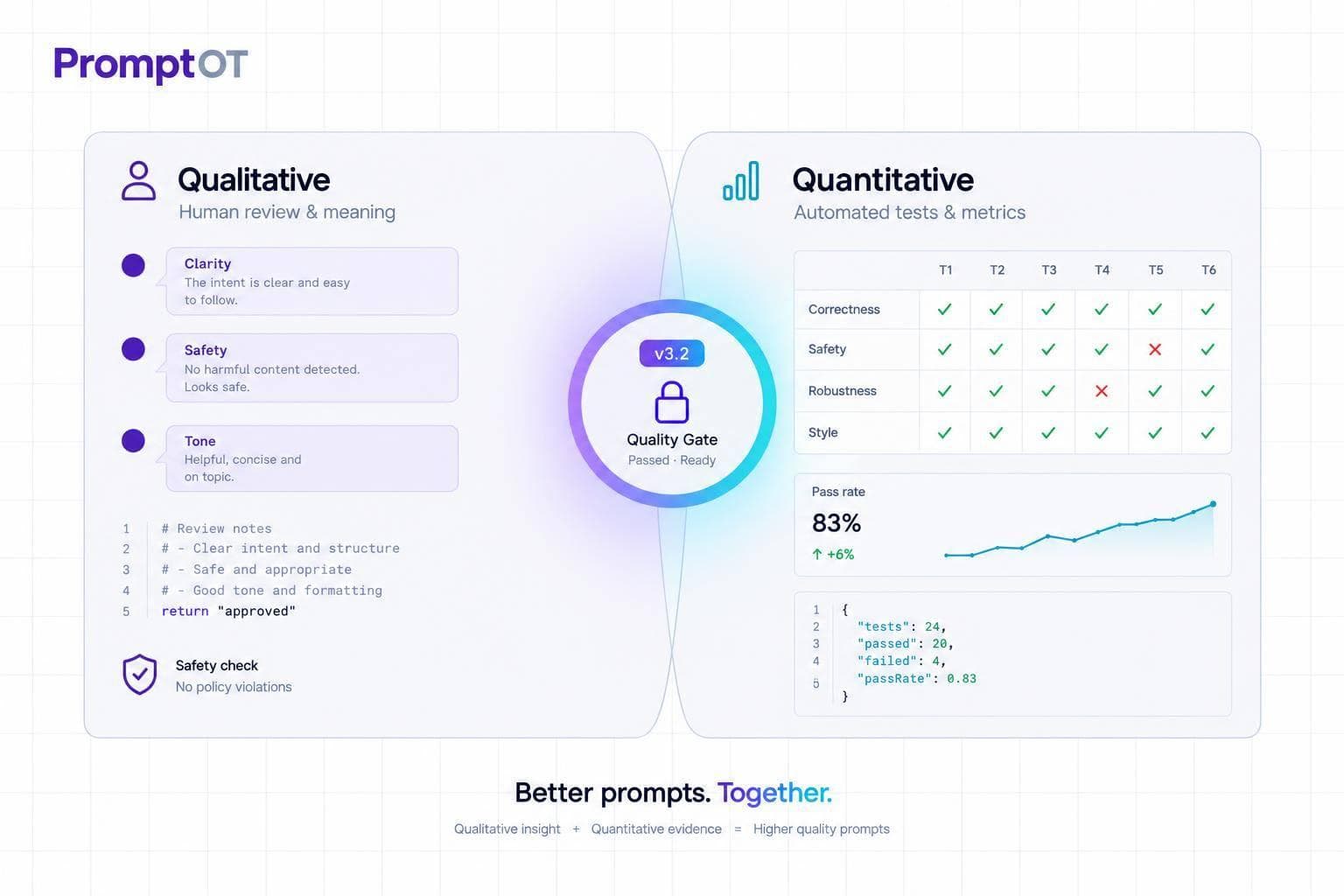
I use human review to judge meaning and risk, and quantitative tests to measure how often outputs meet set criteria. Before releasing a prompt change, I test it against the current version on the same dataset - and check failures, not just average scores.
Here’s how I split the work:
- Human review: Score accuracy, relevance, completeness, tone, instruction following, and safety. I start reviewers with 10 shared examples to align their judgments.
- Quantitative tests: Check answers, required content, formats, schemas, and judge scores. I track latency, errors, token use, and cost separately from quality.
- Release decisions: Set pass thresholds, inspect disagreements, and block changes that fail critical safety checks - even when average scores improve.
- Production checks: Track results by prompt version, protect sensitive logs, set rollback rules, and turn confirmed failures into regression tests.
Quick Comparison
| Criterion | Qualitative evaluation | Quantitative evaluation |
|---|---|---|
| Main question | Why does this answer work or fail? | How often does it meet our criteria? |
| Best fit | Context, ambiguity, tone, and risk | Repeatable checks across many outputs |
| Consistency | Depends on reviewer agreement | Strong for fixed rules; judge scores can vary |
| Time and cost | Requires reviewer time and expertise | Requires setup, test runs, and judge costs |
| Main limitation | People can disagree or miss errors | Scores can miss meaning or reward the wrong thing |
My rule: <u>use both before shipping</u>. I keep each test tied to an exact prompt version; PromptOT can manage revisions and rollback, while scoring and automatic release gates stay outside it. The goal is better release decisions, not just higher scores.
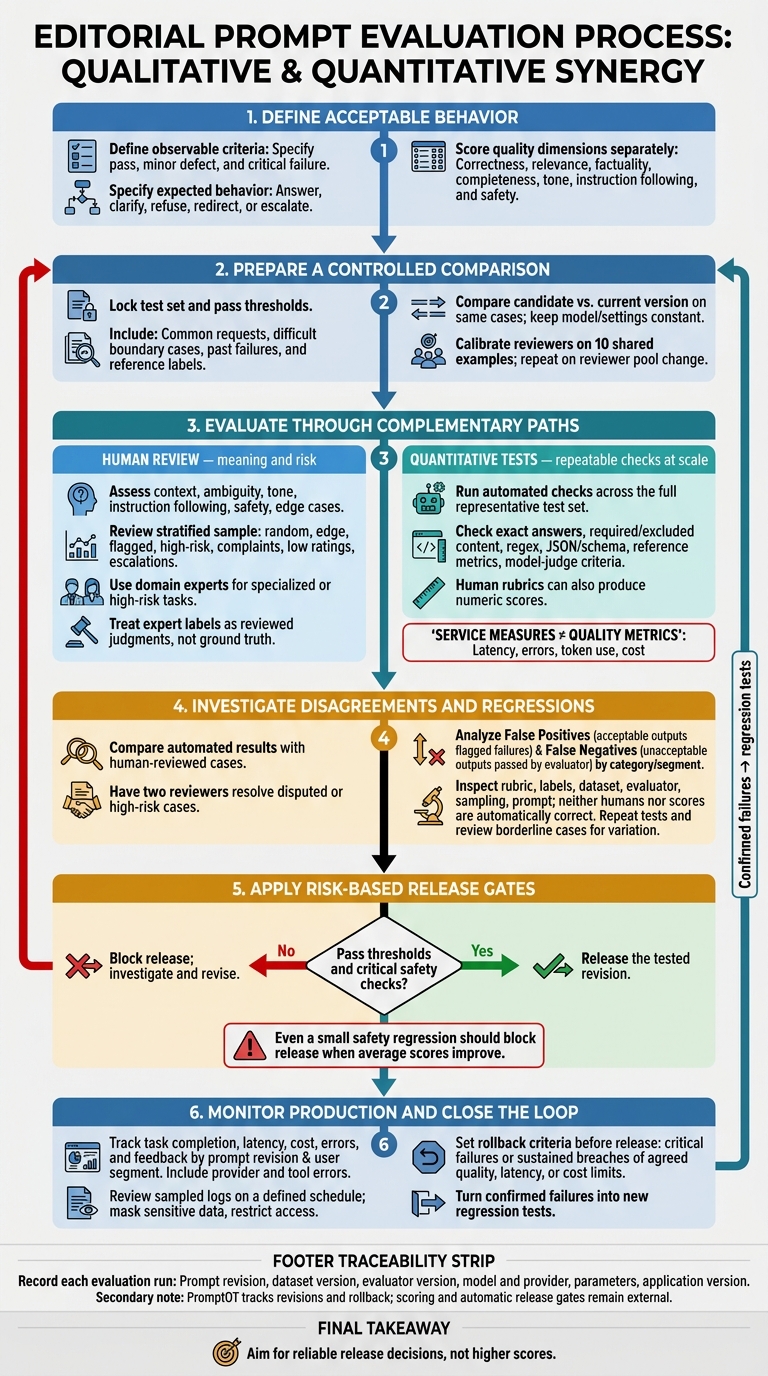
Prompt Evaluation: From Human Review to Safe Release
Measuring & Evaluating LLM Quality - Beyond Traditional Metrics | Uplatz
sbb-itb-b6d32c9
Qualitative Evaluation: Review Outputs With Humans
Qualitative evaluation uses a rubric to score correctness, relevance, factuality, completeness, tone, instruction following, safety, and edge cases. Score each dimension separately. Smooth writing can mask factual errors - and leave you unsure what drove the answer.
Set Up a Consistent Review Process
Define observable criteria for a pass, minor defect, and critical failure. Cover borderline cases and situations where there isn't enough evidence to judge. Use inputs that resemble production traffic: ordinary requests, missing information, adversarial wording, and known failure modes. Give reviewers the relevant source documents, retrieved context, and tool traces. Bring in qualified domain experts for specialized or high-risk tasks.
Before formal review, calibrate reviewers on 10 shared examples. Repeat this step when the reviewer pool changes. Discuss disagreements, clarify the rubric, and agree on rules for escalation and resolving disputes. Keep the original labels alongside final decisions. For each review, record the input, exact prompt version, model and settings, dataset version, output, reviewer, date, scores, and evidence for each failure.
Review Ambiguous and High-Risk Outputs
Use human review for ambiguous, open-ended, or high-risk outputs when a score alone can't tell you whether an answer is acceptable. Specify the expected behavior: answer, clarify, refuse, redirect, or escalate.
Use expert labels to validate automated judges and investigate failures they missed. But treat those labels as reviewed judgments, not ground truth. Experts can disagree or make mistakes.
Account for Review Costs and Disagreement
Review throughput depends on task complexity and reviewer expertise. Fatigue, anchoring, and style preferences can skew judgments. Hide prompt identities where practical, randomize output order, and get second reviews for critical cases.
Small teams should focus on flagged high-risk outputs and representative samples of ordinary traffic rather than checking every response. Give new versions and known failures extra coverage. Track review time, disagreement, and critical-failure rates to decide where more review is needed.
| Dimension | Unstructured review | Rubric-based, calibrated review |
|---|---|---|
| Strengths | Quick discovery of unexpected problems | More consistent, auditable comparisons |
| Prerequisites | Familiarity with the task | Defined criteria, examples, training, adjudication rules |
| Failure modes | Halo effects, inconsistent standards, undocumented decisions | Rubric gaps, shared bias, fatigue, and false precision |
| Best-fit uses | Early exploration and incident triage | Release checks, high-risk workflows, and judge validation |
Use the review findings to define which metrics to test next.
Quantitative Evaluation: Measure Outputs With Tests
Turn the failures found during human review into repeatable checks. Quantitative evaluation applies fixed checks, task metrics, or model judges to a test set. Calibrated human rubrics can also produce numeric scores.
Choose Metrics for the Task
Start with the failure you need to catch. Then choose the narrowest metric that detects it. Deterministic checks use fixed rules. Reference-based metrics compare outputs with expected answers or labels. Model judges assess criteria that are harder to encode.
| Metric | Suitable tasks | Detected failures | Misleading signals |
|---|---|---|---|
| Exact match | Classification, fixed answers | Incorrect labels or values | Rejects valid paraphrases |
| Contains / excludes | Guardrails, required information | Missing information, leaked secrets | Ignores context |
| Pattern (regex) | Predictable formats, IDs | Invalid formatting | Accepts fabricated values |
| Structural (JSON/schema) | API integrations, tool calls | Unparsable output, missing keys | Structure isn't correctness |
| Reference-based metrics | Summarization, translation, question answering | Missing information, meaning drift | Overlap can hide factual errors |
| Model judge | Open-ended generation, support, complex reasoning | Poor tone, unhelpfulness, ungrounded claims | Judge bias, variable scores |
| Human-derived numeric rubrics | High-stakes decisions, tone calibration | Nuance and context failures | Reviewer disagreement |
| Service measures | All production prompts | High latency, token usage, cost in USD, error rates | Not quality metrics |
Set Datasets, Baselines, and Pass Thresholds
Once you've chosen a metric, lock the test set and pass thresholds to keep comparisons stable. Include common requests, difficult boundary cases, past failures, and reference labels where needed. Set a baseline and clear pass thresholds, with separate checks for critical guardrails.
Test candidates against the same cases, keeping the model and other settings constant. Record the prompt, model, and dataset versions, along with the evaluation settings, judge version, and rubric. Use automated release checks to block versions that fall below the thresholds.
Understand Where Scores Fall Short
Scores measure proxies, not overall usefulness. Wording-overlap metrics can penalize valid paraphrases - or reward text that repeats a reference while getting the facts wrong. Automated judges make mistakes, and repeated tuning can overfit a narrow dataset.
Passing a safety check means only that the output passed that specific check. It doesn't establish overall safety. Small score changes may come from run-to-run variation rather than better performance, so repeat tests and review borderline cases before shipping.
Combine Human Review and Metrics Before Release
Use metrics to screen broadly and human review to assess meaning and risk. Run automated checks across the full representative test set. Then review a stratified sample covering random cases, edge cases, flagged outputs, high-risk cases, and examples tied to complaints, low ratings, or support escalations. Humans can assign numeric scores, too. The difference is calibrated judgment versus fixed rules. Use each method where it works best, then compare results on the same cases.
| Dimension | Human review | Automated evaluation |
|---|---|---|
| Evaluation target | Meaning, usefulness, context, nuance, and risk | Deterministic checks, reference answers, and judge criteria |
| Scale | Targeted or stratified samples | Broad test-set and production coverage |
| Repeatability | Depends on the rubric and reviewer agreement | Strong for fixed rules; model judges can vary |
| Cost and speed | Slower; requires reviewer time | Faster at scale; setup and judge costs remain |
| Nuance and ambiguity | Assesses nuance, tone, and ambiguity | Needs calibration and interpretation |
| Service failures | Finds confusing user experiences and harmful outcomes | Measures latency, errors, cost, and tool failures |
| Expert needs | Domain expertise for high-stakes judgments | Test design and evaluator-validation expertise |
| Regression testing | Determines whether changes matter to users | Detects changes across a fixed suite |
When the methods disagree, inspect the failure category before changing the prompt.
Investigate Disagreements Between Reviewers and Metrics
Compare automated results with a representative human-reviewed sample. Have two reviewers resolve disputed or high-risk cases and assign reference labels. Count false positives - acceptable outputs flagged as failures - and false negatives - unacceptable outputs passed by the evaluator - by failure category and user segment.
If disagreement is large, check the rubric, label definitions, dataset composition, metric or judge model, judge instructions and context, sampling strategy, and prompt. Neither a reviewer nor a high score is automatically correct.
Once you understand the disagreements, turn the checks into a release gate.
Test From Baseline to Production
Compare revisions under matching conditions, then manually inspect regressions. Use risk-based release gates: even a small safety regression should block release when average scores improve. Record the prompt revision, dataset version, evaluator version, model and provider, parameters, and application version with each run. Reevaluate after changes to the prompt, model, provider, retrieval, or tools.
Production monitoring provides evidence that offline tests can't: unexpected requests, failed tool calls, provider errors, and changing user behavior. Track task completion, latency, cost, errors, and feedback by prompt revision and user segment, including provider and tool errors.
Review sampled logs on a defined schedule, mask sensitive data, and restrict access. Set rollback criteria before release, including critical failures or sustained breaches of agreed quality, latency, or cost limits. Turn confirmed failures into new regression tests.
Manage Tested Prompt Versions With PromptOT
If your team needs versioned prompt management for this workflow, PromptOT can track the exact revision under test. Use draft/published states and version history to trace tested revisions, and instant rollback to restore a previous revision.
Test runtime {{placeholders}} with realistic values. Link external evaluation records to the exact prompt revision, model, provider, parameters, dataset version, and evaluator version. HMAC-signed webhook notifications can connect prompt changes to external evaluation workflows. Scoring and automatic release gates remain outside PromptOT.
Conclusion: Use Scores and Human Judgment Together
Scores make checks repeatable at scale; human review checks whether those scores reflect output quality. Use metrics for consistency and human judgment for nuance and risk.
Base release decisions on a locked test set, a rubric, task-specific checks, and a baseline you can roll back to.
When results drift, test the evaluator, too. If failures recur or reviewers disagree with scores, update the dataset, rubric, or evaluator - not just the prompt. Aim for reliable release decisions, not higher scores.
FAQs
How many test cases do I need for reliable results?
The number of examples you need depends on how small a change you want to detect. Start with 20–50 examples for major regressions and sanity checks. During development, use 100–200 to detect improvements of 10–15 percentage points. For production decisions, use 500+ to detect shifts of 5–7 percentage points with enough confidence.
Reviewing just 5–10 examples is unreliable: you may miss a 20% drop in quality one-third of the time.
How do I set realistic quality thresholds?
Before testing, choose 3 to 5 metrics that match user requirements, such as task success rate, format compliance, or F1 scores. Set clear pass/fail targets for each metric in your development pipeline.
For example, block deployments if a candidate prompt’s task accuracy drops more than 2% from your baseline.
Use the same metrics for offline validation, staging checks, and production monitoring so evaluations stay consistent.
How much human review does my app need?
Human review is needed to define evaluation criteria, calibrate automated judges, and assess high-stakes work in healthcare, finance, or legal compliance. Review manually when prompt changes push regression rates above 5%, or when metrics miss nuances in tone, clarity, or brand voice.
Regularly spot-check 5% to 10% of automated verdicts to keep scores aligned with human judgment and catch rubric drift before it affects production.